// POSTED BY Joe ON Oct 15, 2023, 10:56 PM
Aim Assist is gone: How to improve aim assist in MWIII
When MWII was released, PC players were furious about how OP aim assist was, understandably, console players were more than happy to receive the buff. It was so powerful that hardcore K&M players switched to controller.
In Call of Duty MWIII, players in the Open Beta have a clear agreement that the developers of MWIII have now gone too far in the other direction – the aim assist is almost useless, and controller players are struggling to adjust to the new lack of aim assist in MWIII.
How to improve Aim Assist in MWIII?
Open your settings, scroll to Controller and tab across to “AIMING”. Scroll to the bottom of this list and you’ll see “Aim Assist”.
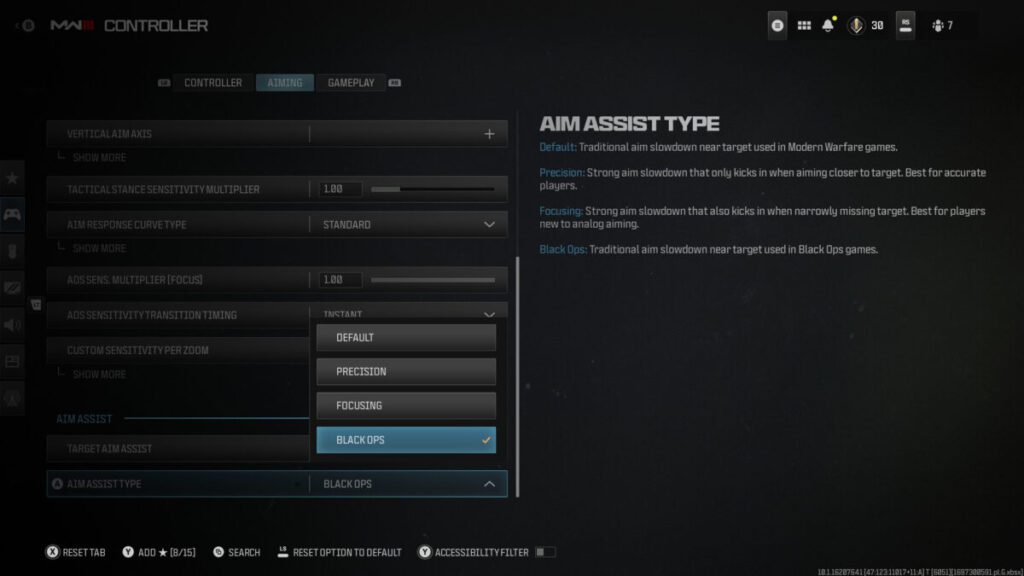
Under “Aim Assist Type”, change the default to “Focusing”, which will give you a much stronger aim assist. The description of Focusing is:
Strong aim slowdown that also kicks in when narrowly missing target Best for players new to analog aiming.
The Focusing Aim Assist in MWIII is really helpful to slow down your aim movement when near a target, it doesn’t snap onto them by any means, but it’s a much smoother aiming curve that the default or Black Ops variants.
Actions & Share

Joe
More from Call of Duty: MWIII
Who is making COD 2023?
Does player visibility in Call of Duty MWIII suck?
COD MWIII meta gun - Striker loadout & guide
Modern Warfare Zombies Unleashed
How to Hide Tactical ADS in MWIII
Modern Warfare III Multiplayer: Reliving the Classics and Embracing the New
How to find the parkour jump spot on MWIII Highrise
Aftermarket Parts Redefine Weapon Customisation in MWIII
Urzikstan - The new Battle Royale Map for Warzone
CoD MWIII Zombies is looking interesting. All Perks, Wonder Weapons, and more.
Battlerage in Call of Duty MWIII is super overpowered
Welcome to the Modern Warfare III Beta - Weekend One!
Related Posts
No related posts found.