// POSTED BY Róisín ON May 7, 2026, 10:39 AM
How to Use a Cartography Table in Minecraft (Complete Guide)
If you’re exploring your world and want better maps, learning how to use a cartography table in Minecraft is a game-changer. It lets you expand maps, lock them, copy them, and even add markers.
Here’s exactly what a cartography table does and how to use it properly.
🧱 What Does a Cartography Table Do in Minecraft?
A cartography table is used to improve and manage maps. With it, you can:
- Expand a map’s size
- Copy maps
- Lock maps so they don’t update
- Add markers (Bedrock Edition)
👉 It’s one of the most useful blocks for exploration and navigation.
🛠️ How to Make a Cartography Table
To craft a cartography table, you need:
- 2 paper
- 4 wooden planks (any type)
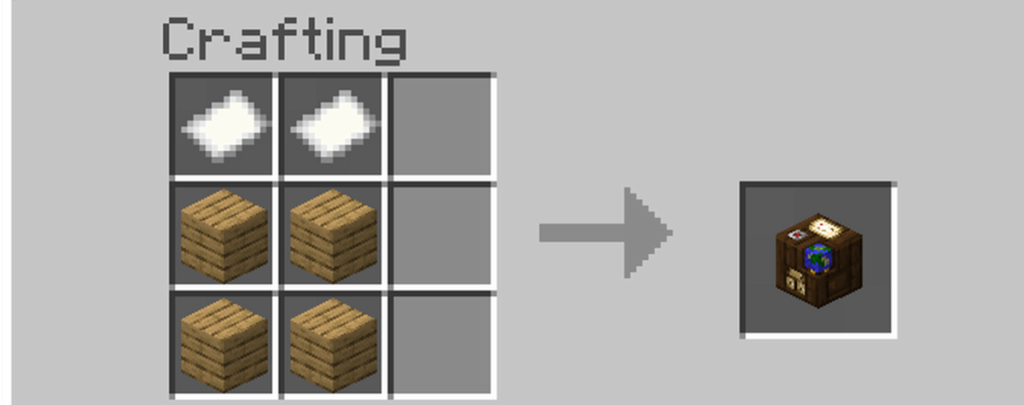
Place the 2 paper in the top row and the 4 planks underneath.
🗺️ How to Use a Cartography Table in Minecraft
To use it:
- Place the cartography table
- Right-click/tap to open it
- Put your map in the first slot
- Put the required item in the second slot (depends on what you want to do)
Unsure of how to make a map? Check out our article here to learn how!
📌 1. How to Expand a Map
If your map feels too zoomed in, you can expand it.
What you need:
- 1 map
- 1 paper
Steps:
- Put the map in the first slot
- Put paper in the second slot
- Take the expanded map from the output
✅ This zooms out and covers a larger area.
📄 2. How to Copy a Map
Want an extra map for a friend?
What you need:
- 1 map
- 1 blank map
Steps:
- Place your filled map in the first slot
- Place a blank map in the second slot
- Take the copied map
✅ Both maps will show the same explored area.
🔒 3. How to Lock a Map (Stop It Updating)
Locking a map is great if you want it to stay the same forever.
What you need:
- 1 map
- 1 glass pane
Steps:
- Put the map in the first slot
- Put the glass pane in the second slot
- Take the locked map
✅ The map will no longer update even if you explore new areas.
📍 4. How to Add Map Markers (Bedrock Edition)
On Bedrock, you can add markers so you don’t get lost.
What you need:
- A map
- A banner (placed in the world)
Steps:
- Place a banner where you want the marker
- Use the map on the banner
✅ The banner will appear as an icon on your map.
🧠 Why Use a Cartography Table Instead of Crafting?
You can do some map upgrades in a crafting grid, but the cartography table is:
- Faster
- Easier
- More organised
Plus, it looks great in villages or survival bases.
🎯 Final Thoughts
Now you know how to use a cartography table in Minecraft, you can create bigger maps, copy them for friends, lock your progress, and stay organised while exploring.
If you’re planning a long survival world, a cartography table is absolutely worth building early.
🧪 Want more Minecraft news and guides?
👉 Bookmark our Minecraft section and follow us for daily Minecraft tips, tutorials, and mod guides!
Actions & Share
